Some friends asked so the following is how I encode (rip) DVDs.
Choosing the file format: .AVI, .OGG, .MP4 or .MKV ?
The ripped video file format is a decision you must make. Currently my format of choice is .MKV or Matroska. I’ll explain why.
It is quite silly to say that an .MP4 movie has better quality than a .AVI or vice-verse (or any other combination of comparisons). OGG, MP4 (MPEG-4 Part 14), MKV (Matroska), AVI, WMV (or ASF) are just containers, envelopes. Video quality depends on what goes inside it.
“Multimedia” has this name because you have multiple types of media: video in multiple angles, multiple audio options including different languages and channels (stereo, 5.1, 6 channels etc), subtitles in several languages, chapter information, menu etc. Think about a DVD. So this is a graphical view of how things are organized inside a 900MB movie file in a modern format as MKV or MP4:
| Header with tags, track names, chapters info, seek positions | Main Video track (MPEG-4 AVC/H.264) | Attachments as JPG images, documents, scripts or text files | |||||||
| Video segment showing another angle (MPEG-4 ASP/Xvid/DivX) | |||||||||
| Audio track: English Dolby Surround 5.1 (AC3) | |||||||||
| Audio track: Director’s comments stereo (MP3) | |||||||||
| Audio track: Portuguese Dolby Surround 5.1 (DTS) | |||||||||
| Subtitle track: Portuguese (Unicode text) | |||||||||
| Subtitle track: Chinese (Unicode text) | |||||||||
| Subtitle track: English (VobSub) | |||||||||
| byte 100K | byte 100M | byte 200M | byte 310M | byte 420M | byte 530M | byte 650M | byte 780M | byte 895M | byte 900M |
A digital multimedia file format must be capable to contain all this different medias and multiplex them in parallel so you won’t have the video in the first 500MB of the file and the audio on the following 500MB (this can’t work for streaming). And this is exactly what modern file formats as MP4 and MKV do: they carry all your movie-related data together.
This is a comparison of all these file formats based on my personal experience with them (a more formal comparison can be found in Wikipedia):
| .MKV | .MP4 | .AVI | |
|---|---|---|---|
| Industry support | Almost none | Good and increasing, specially on Apple platforms, the mobile scene and Nero Digital ecosystem | Treated as legacy popular format |
| Usage on the web | Very popular on HD or high quality DVD rips | Very popular on HD or high quality DVD rips, supported by Flash Player, YouTube, Google Video | Popular amongst low-quality DVD rips |
| Support for advanced video formats and multiple video angles | Yes. MPEG-4 ASP (DivX, Xvid), MPEG-4 AVC (a.k.a. H.264) etc | Yes. Only MPEG-4 systems and a few others | Problematic and No |
| Support for multiple audio tracks (channels, formats, languages and “director’s comments”) | Yes | Yes. Formats are only MP3, AAC and a few others not very popular | Yes |
| Support for tags (artist, title, composer, etc as MP3’s ID3) | Yes | Can be supported by MP4 extensibility but this is not very well standardized across authoring tools (iTunes, GPAC etc) and players (Amarok, Media Player Classic, iPod, Windows Media Player etc) | No |
| Support for attachments with mime-types (used to attach movie posters images or other files) | Yes | No | |
| Support for chapter marks | Yes | No | |
| Support for multiple language embedded soft-subtitles | Yes. VobSub (as extracted from DVDs), plain timed UTF-8 text (SRT, SUB) etc | No | |
| Support for naming tracks with human names as “Director’s comments” or “Portuguese subtitles” etc | Yes | Yes | No |
| Support for carrying menus information (as in DVDs) and interaction | Yes through an XML idiom, but unsupported by most players | Yes through SVG, but unsupported by most players | No |
| The container overhead in bytes in the final file | Very small | Very small | Very big |
| Supported by free and Open Source multiplatform authoring tools | Perfect on Linux, Unix, Windows and Mac | Yes (see GPAC), with some intellectual property issues. Tools need to mature. | Yes |
| Ready for popular web streaming as in Flash player | No | Yes. The popular Flash Player that is installed on everybody’s browser supports playing MP4 files as long as they contain H.264 video and AAC audio tracks. I recommend the LongTail FLV/MP4 Player since it also plays subtitles embedded in MP4 files. | No |
Personally I believe MP4 is the multimedia file format for the future because since it is getting popular, all these non–standardized features will get stabilized. MP4 is an ISO standard and the increasing industry support can be felt on iPods and portable devices, and most notable on home DVD players capable of playing the 700MB MP4 video file burned in a CD.
By the way, remember this:
- MP4 is not an evolution of MP3. AAC (MPEG-4 Part 3) is.
- MP5 and MP6 (used to classify portable media players) are things that simply doesn’t exist in the multimedia scene.
- .M4A, .M4V, .MOV and .3GP files can safely be renamed to .MP4. They just use to be different extensions to help user’s eyes easily identify whats inside.
Meanwhile, MKV wins everything but on the Industry Support category. But this doesn’t really matter, and I’ll explain why. Since MKV is just a container, the large video, audio etc streams can be extracted and repackaged into MP4 and vice-versa in seconds. No transcoding (decoding followed by a lossy encoding into another format) is needed.
So today I store my videos in the most feature rich and well supported by players format: MKV.
OGG or OGM (the container file format) is practically dead in my opinion. They were created as part of the Xiph initiative for a complete open source patent-free multimedia framework, but seems nobody uses it anymore for video. From the same family, Vorbis (the audio codec compared to MP3, a.k.a. .OGG) is very good but also very not popular. Theora (the video codec) is frequently comparable to old MPEG-1 in terms of quality and compression ratio so currently, if you want quality and are not concerned about patents, MPEG-4 AVC is the best choice. FLAC, Xiph’s lossless audio codec, is the winner of the family: very popular, massively used, and recommended.
Encoding the DVD
I use HandBrake, the most practical Open Source (and overall) movie encoder. It runs on Linux, Mac and Windows and uses the same Open Source libraries as ffmpeg, mplayer/mencoder, xine, etc. While these programs are generic video handlers (with thousands of confusing configuration parameters to sustain this generalistic status) HandBrake is optimized only for ripping so it is very easy to use, yet extremely powerful.
#!/bin/bash
##
## This is the script I use to make hifi DVD rips including chapter markers and
## subtitles. It uses Handbrake.
## Contains what I found to be the best quality ripping parameters and
## also let me set simple parameters I need.
##
## Avi Alkalay <avi at unix dot sh>
## http://avi.alkalay.net/2008/03/mpeg4-dvd-rip.html
##
## $Id$
##
#set -vx
HANDBRAKE=${HANDBRAKE:=~/bin/HandBrakeCLI}
#HANDBRAKE=${HANDBRAKE:="/cygdrive/c/Program Files/Handbrake/HandBrakeCLI.exe"}
## Where is the Handrake encoder executable.
## Handbrake is the most practical free, OSS, DVD riper available.
## Download HandBrake for Linux, Mac or Windows at http://HandBrake.fr
INPUT=${INPUT:=/dev/dvd}
## What to process. Can also be a mounted DVD image or simply '/dev/dvd'
TITLE=${TITLE:=L}
## The title number to rip, or empty or "L" to get the longest title
#CHAPTERS=${CHAPTERS:=7}
## Example: 0 or undefined (all chapters), 7 (only chapter 7), 3-6 (chapters 3 to 6)
#VERBOSE=${VERBOSE:="yes"}
## Wether to be verbose while processing.
SIZE=${SIZE:=1200}
## Target file size in MB. The biggest the file size, the best the quality.
## I use to use from 1000MB to 1400MB for astonishing high quality H.264 rips.
OUTPUT=${OUTPUT:="/tmp/output.mkv"}
## Output file. This will also define the file format.
## MKV (Matroska) is currently the best but MP4 is also good.
AUDIO=${AUDIO:="-E ac3 -6 dpl2 -D 1"} # For AC3 passthru (copy).
#AUDIO=${AUDIO:="-E lame -B 160"} # For MP3 reencoding. Good when input is DTS.
## Audio parameters. If input is AC3, use it without transcoding.
## If is DTS, reencode to MP3.
MATRIX=${MATRIX:=`dirname $0`/eqm_avc_hr.cfg}
## x264 matrix to use. The matrix file may increase encoding speed and quality.
## This one is Sharktooth's as found
## at http://forum.doom9.org/showthread.php?t=96298
######### Do not change anything below this line ##############
## Make some calculations regarding title and chapters based on parameters.
SEGMENT=""
if [[ "$TITLE" == "L" || -z "$TITLE" ]]; then
SEGMENT="-L"
else
SEGMENT="-t $TITLE"
fi
[[ -n "$CHAPTERS" && "$CHAPTERS" -ne 0 ]] && SEGMENT+=" -c $CHAPTERS"
[[ "$VERBOSE" != "no" ]] && VERB="-v"
# Define args for the x264 encoder. These are some values I found on the net
# which give excelent results.
X264ARGS="ref=3:mixed-refs:bframes=6:b-pyramid=1:bime=1:b-rdo=1:weightb=1"
X264ARGS+=":analyse=all:8x8dct=1:subme=6:me=umh:merange=24:filter=-2,-2"
X264ARGS+=":ref=6:mixed-refs=1:trellis=1:no-fast-pskip=1"
X264ARGS+=":no-dct-decimate=1:direct=auto"
[[ -n "$MATRIX" ]] && X264ARGS+=":cqm=$MATRIX"
# Encode...
"$HANDBRAKE" $VERB -i "$INPUT" -o "$OUTPUT" \
-S $SIZE \
-m $SEGMENT \
$AUDIO \
-e x264 -2 -T -p \
-x $X264ARGS
# Repackage to optimize file size, to include seek and to include this
# this script as a way to document the rip...
echo $OUTPUT | grep -qi ".mkv"
if [[ $? && -x `which mkvmerge` && -f $OUTPUT ]]; then
mv $OUTPUT $OUTPUT.mkv
mkvmerge -o $OUTPUT $OUTPUT.mkv \
--attachment-name "The ripping script" \
--attachment-description "How this movie was created from original DVD" \
--attachment-mime-type application/x-sh \
--attach-file $0
[[ -f $OUTPUT ]] && rm $OUTPUT.mkv
fi
The script seems long because it is fully documented but it actually only collects some parameters and simply runs the HandBrake encoder like this (passed parameters are in red):
~/bin/HandBrakeCLI -v -i /dev/dvd -o /tmp/output.mkv \ -S 1200 \ -m -L \ -E lame -B 160 \ -e x264 -2 -T -p \ -x ref=3:mixed-refs:bframes=6:b-pyramid=1:bime=1:b-rdo=1:weightb=1:analyse=all:8x8dct=1:subme=6:me=umh:merange=24:filter=-2,-2:ref=6:mixed-refs=1:trellis=1:no-fast-pskip=1:no-dct-decimate=1:direct=auto:cqm=~/src/randomscripts/videotools/eqm_avc_hr.cfg
All the rest is what I found to be the best encoding parameters.
The resulting video file (/tmp/output.mkv in this case) will contain correctly cropped video and audio quality as good as the DVD (it is almost lossless), and chapter breaks at the same positions read from the DVD.
In a Core Duo machine as my laptop running Fedora 8 or Windows XP, a 2 pass H.264 encoding (2 pass improves quality and H.264 is newer standard MPEG-4 technology better than DivX/Xvid) takes about 4 to 5 hours for a regular 2 hours movie, so leave it encoding while you go to sleep. A Pentium 4 machine running Ubuntu takes about 17 hours for the same rip.
I use to rip one chapter from the movie first (use your preferred video player or lsdvd command to find the shortest chapter), check quality, compare to DVD, fine tune, try again and then shoot full DVD ripping.
After encoding I use to repackage the audio/video stream with Matroska‘s mkvmerge (or mmg, its GUI version available on any Linux distribution as “mkvtoolnix” package, and installable for Windows or Mac OS from Matroska’s website) to optimize seeks and to include soft subtitles (that can be turned on and off as on regular DVDs), but I’ll explain that in another HOWTO.
Give Your Ripped Movie a Descriptive File Name
I use to organize my media library in a standard way I invented for myself and which I suggest you to use too.
My movie file names shows everything that the file includes. Some examples:
- Indiana_Jones_and_The_Raiders_of_the_Lost_Ark_IMDB{tt0082971}-Xvid{720x304_23.98fps}+MP3{ENG,POB_VBR}+Sub{ENG,SPA,POB}+Covers.mkv
This is the Indiana Jone’s Raiders of the Lost Ark movie, whose IMDB index is tt0082971 (IMDB{tt0082971}). It was ripped with the old Xvid codec and contains 720×304 pixels frame size at a rate of 23.98 frames per second (Xvid{720x304_23.98fps}). It also contains selectable audio tracks in English and Brazilian Portuguese encoded in variable bit rate MP3 (MP3{ENG,POB_VBR}). In addition, there is also selectable subtitles in English, Spanish and Brazilian Portuguese (Sub{ENG,SPA,POB}). The file also contains the cover images as attachments. - Harold_and_Maude_IMDB{tt0067185}-H264{672x368_3Pass_25fps}+HEAAC{EN}+Sub{POR,EN,FRE}+Chapters+Covers.mkv
The old Harold and Maude movie whose IMDB index is tt0067185 (IMDB{tt0067185}). It is encoded with H.264 in 3 passes and has 672×368 pixels frame size at a rate of 25 frames per second (H264{672x368_3Pass_25fps}). There is only one English audio track encoded in modern HE-AAC (HEAAC{EN}). Subtitles in Portuguese, English and French (Sub{POR,EN,FRE}), chapter information and attached cover images. This is very complete high quality DVD backup. - I_Am_Legend_IMDB{tt0480249}-H264{704x304_23.98fps}+AC3{ENG_5.1}+Sub{POR}.mkv
The I Am Legend movie whose IMDB index is tt0480249 (IMDB{tt0480249}), video encoded in H.264 with 704×304 pixels frame size (H264{704x304_23.98fps}), original 5.1 channels AC3 audio in English (AC3{ENG_5.1}) and subtitles in Portuguese (Sub{POR}).
The advantages of this scheme are:
- It is web safe with no spaces in filenames. All underlines. It is also DOS safe.
- To have the IMDB index let me know exactly which movie this file contains. This is particularly good to avoid ambiguity for movies that have remakes as Ben Hur, or movies that have an official name but are well known by other names or have international titles.
- To know the encoding method, subtitles included and chapters info give me the overall quality of the movie right away.
- Special attention to audio and subtitle languages. Having them on the filename let me know I will understand its content without having to play. Sometimes I can’t play the file because I logged in my home computer remotely.
Playing the Ripped File
To play this advanced Matroska media file that contains such a rich set of metainformation and highly compressed digital content you will need an advanced player too. And happens that the best players are the Open Source ones. So use these players:
- On Windows: the k-lite codec pack with the Media Player Classic (which is better than Microsoft’s Windows Media Player)
- On Linux: use MPlayer or Xine (or variants as Kaffeine, GMPlayer, KPlayer, KMPlayer) available from your Linux distribution’s package repositories. For example, see the instructions to get them on a Fedora installation.
- On Mac: install the Perian open source codecs to make your Quicktime play many new multimedia formats, including MKV. The VLC Media Player is a different media player that works.
These are Media Player Classic screenshots demonstrating how to activate the advanced content inside a Matroska file. Players on other platforms have similar capabilities and menus.
Activating embedded subtitles and languages
The player lets you choose the audio language and subtitles. On MPC for example, this is how you turn on and off and choose the language for subtitles.
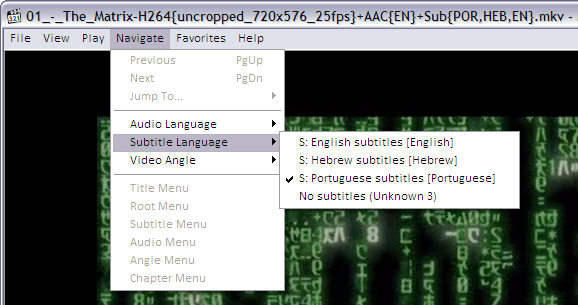
As you can see, the player found subtitles embedded in the MKV file in English, Hebrew and Portuguese.
If the MKV file contains many audio tracks (as different languages, director’s comments etc) this is how to select it:
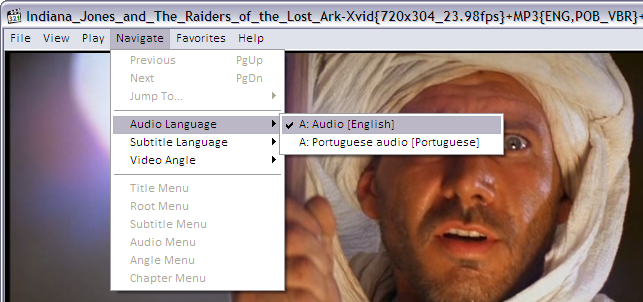
And to jump directly to a specific chapter on the movie, if the MKV file contains this kind of information:
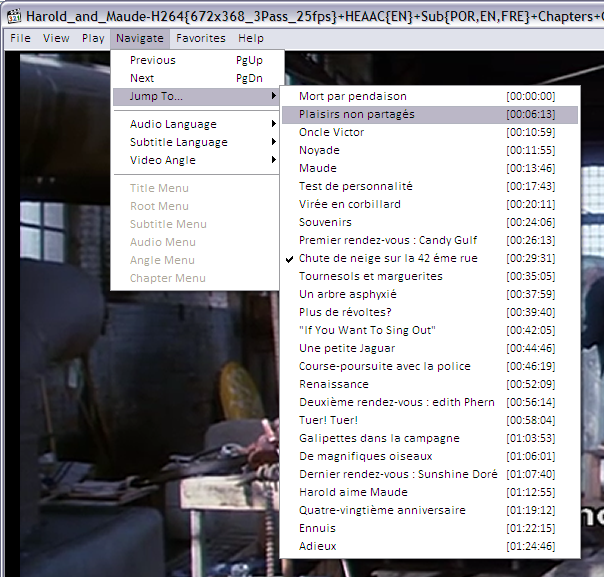
Improving audio volume
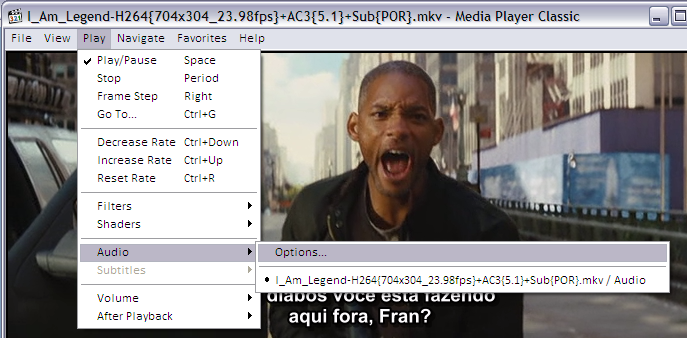
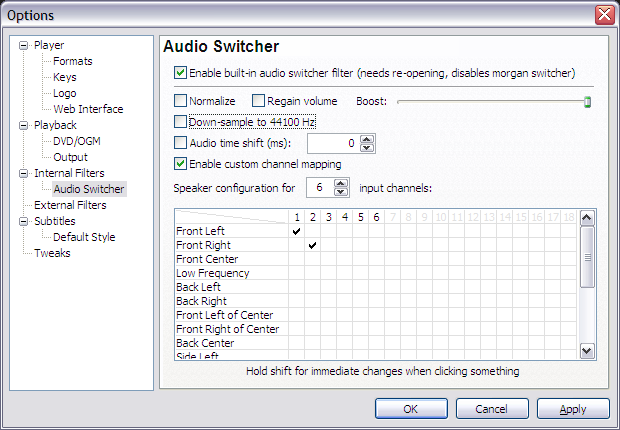
If you ripped the movie without reencoding the audio, the final file will contain DVD’s original AC3 audio tracks in 6 channels (5+1). This may sound with a lower volume when played in a 2-speaker system as your laptop, iPod, etc because 4 channels are simply not being played. To remediate this the player will have to downsample the audio. In other words, it will remix the 6 channels into 2 stereo channels while playing. The Media Player Classic options should look like this:
O script gera um arquivo output.mkv? Como foi feito por você, devia ser output.avi…
/me runs
Falando sério agora, legal sua dica. Vou testar esse HandBrake e guardar seu script por aqui. Fico no aguardo das dicas pra legenda.
Valeu,
– Ademar
DVDs are not High Definition. Now go and repeat the same with Bluray disc.
OK Troll, I meant to say high quality, or the highest definition your DVD can provide.
You can use exactly the same script to rip BluRay discs. You will only have to fine tune the file size because BluRay movies have bigger frames.
Valeu pelo tutorial estava procurando isso já fazia um tempo
Thanks Avi! This tutorial is just what I have been looking for. I am eagerly awaiting your next HOWTO on optimizing seeks and including soft subs. Hope it comes out soon! =]
Eita Avi! To vendo que gostou mesmo do Handbreake 😀 Abraco!
Avi, eu usei o seu script e retornaram 2 erros:
./rip.sh: line 55: fim do arquivo inesperado enquanto procurava por `”‘
./rip.sh: line 95: erro de sintaxe: fim de arquivo inesperado
Alguma idéia do que pode ser? Abraço!
Evandro, when I pasted the script into this post, the quotes where modified.
I fixed that. Try to copy the script again from this page.
Ok, I have a large dvd collection that I would like to rip. One reason is b/c I’d like to either get Apple TV, or a Mac mini to run my collection. The other reason, is that I’m splitting the entire collection with the ex, and don’t feel like purchasing all the other movies again. I have Handbrake on my MBP, but I could really use some help on step by step ripping. I’d like to benefit from the closest to original quality I can get, so that I don’t view pixelated mosaics on my 46″ LCD. Help! I don’t know anything about running scripts, and I apologize for my lack of know how, but I beg for assistance!
How can I begin ripping the collection?
How can I get the best quality?
My TV supports 1080P, does it matter in the ripping process?
I have 2 1TB external drives, what is the first step (aside from turning on the oven and sticking my head inside)?
how to use this script?
tks!
Como faço pra usar este script com o HandBrake?
A step-by-step guide would be nice to show and convince everyone why this is the best way. I just installed Handbrake and left it on default…chose FILM and ripped Matrix as a test. DVD contains multiple audio tracks, subtitles, etc….but my ripped .mkv encoded with H264 had no extra audio tracks or any subtitles.
But even if this is the best method to rip dvd’s….it’s probably not until standalone dvd’s start playing these formats. I haven’t seen any players here in Toronto that can play .mp4 or .mkv extensions. Divx/Xvid, that’s it! If there is one, it probably costs a fortune in comparison to a divx/xvid dvd player so no thank you…
On a positive note. Handbrake ripped the dvd super fast, with excellent quality. I was playing around with Gordian Knot for a week, trying to get the best results and it cannot compare to Handbrake or Matroska…same file size!
If it would keep additional audio and let me select the subs I want it, while maintaining compatibility with today’s standalone dvd players this thing kicks ass.
Andrew.
A step-by-step guide would be nice to show and convince everyone why this is the best way. I just installed Handbrake and left it on default…chose FILM and ripped Matrix as a test. DVD contains multiple audio tracks, subtitles, etc….but my ripped .mkv encoded with H264 had no extra audio tracks or any subtitles.
But even if this is the best method to rip dvd’s….it’s probably not until standalone dvd’s start playing these formats. I haven’t seen any players here in Toronto that can play .mp4 or .mkv extensions. Divx/Xvid, that’s it! If there is one, it probably costs a fortune in comparison to a divx/xvid dvd player so no thank you…
On a positive note. Handbrake ripped the dvd super fast, with excellent quality. I was playing around with Gordian Knot for a week, trying to get the best results and it cannot compare to Handbrake or Matroska…same file size!
If it would keep additional audio and let me select the subs I want it, while maintaining compatibility with today’s standalone dvd players this thing kicks ass.
Andrew.
While it may be a great way to make dvd backups for the pc, it’s absolutely useless if you want to watch any of those backups on your standalone dvd player because as far as I know none support Matroska. It’s DiVX or XViD, period.
Thank you for this guide – it’s been very useful so far. I’m still eagerly awaiting your guide on repacking the ripped file, though – it will be *really* nice to read it!
I enjoyed the article. Thanks. I am going to try the advanced options that you have for the H.264, is there anything else I need to change to try to match your settings? Do I need to do a custom query? I am just trying to find the best compression with least quality loss. I want to do MKV (H264/AC3). Hopefully this all works. Thanks again for the help.
I tried to use this script to encode a movie (a legally owned ‘Batman Begins’ movie), but with no success. I’m using Ubuntu 8.04, I’ve changed the script to reflect my system, to no effect. I receive this error message:
x264 [error]: can’t open file ‘./eqm_avc_hr.cfg’
./ripar: line 81: 7886 Segmentation fault “$HANDBRAKE” $VERB -i “$INPUT” -o “$OUTPUT” -S $SIZE -m $SEGMENT $AUDIO -e x264 -2 -T -p -x $X264ARGS
, where ‘ripar’ is the name I gave to the script. Anyone has a clue about what is going wrong?
PS: Sim, eu sou brasileiro, mas uma pergunta em inglês tem mais chance de ser respondida… 😀
Problem solved.
can someone please tell us how we’re supposed to make use of this script? what do we need to change from the script to match our own computer and what should be left as is?
I am receiving the same message as Vinny when I try to run this script on my server (same movie, oddly enough) 🙂 The script runs fine on my laptop. What can I do to fix it?
Vinny and DamnGoodNachos, you problem is that HB can’t find the matrix file.
Please be sure that a file named eqm_avc_hr.cfg is located in the directory referenced by the parameters in the script.
As the comments on the script explain, get the matrix file from http://forum.doom9.org/showthread.php?t=96298
Hi Avi,
Great to see some pointers on the net for using Handbrake to make mkv files. Just wondering, what parts of the script shown above do you put in the Advanced H256 box on Handbrake? (the whole thing).
I am running Handbrake version 0.9.2 version – 2008021900 which looks slightly different from the screens on your version.
Thanks in advance,
Scott
Scott, is something like:
ref=3:mixed-refs:bframes=6:b-pyramid=1:bime=1:b-rdo=1:weightb=1:analyse=all:8x8dct=1:subme=6:me=umh:merange=24:filter=-2,-2:ref=6:mixed-refs=1:trellis=1:no-fast-pskip=1:no-dct-decimate=1:direct=auto:cqm=~/src/randomscripts/videotools/eqm_avc_hr.cfg
Thanks Avi,
Will give that a try and let you know how I get on.
Thank AVI its a good script. However I prefer to transfer the DVD contents to the HardDisk first with dvdbackup
dvdbackup -i /dev/dvd -o some_dir -M
The dvd is noisy and it will eventuallly break if working 10+ hours for each DVD
Pretty amazing, but, how did you achieve to put multiple subtitles? I know how to put multiple languages on the MKV file, but not the subtitles. Any help will be appreciated.
I have Windows Vista, use HandBrake MKV container + H.264 codec, AVG Bitrate at 1800, FPS same as source.
I found a problem in your script while I searched the parameters in x264 settings, it is, in the first line of the script you use “ref=3”
and in the middle it is “ref=6”, now it is ref 3 or ref 6 ? It is a conflict in my opinion.
Because I use HandBrake v0.9.3 I compared your script options with the “Film” Profile in “High Profile” on HandBrake.
These are the differences:
subme==subq
bime – is activated automatically on subme>=5
note: trellis is considered experimental and it is not a good thing when you encode animations or cartoons.
b-rdo – is automatically activated on subme >=7
merange=24: it can be modified from options, Motion Estimation Range=24
filter=-2,-2: it is also named “deblock”
ref=6:
no-dct-decimate=1: produce artefacts when used and when is target bitrate specified, it can be activated from options, tick No DCT-Decimate,
cqm=~/src/randomscripts/videotools/eqm_avc_hr.cfg
P.S. Above I talk about your script: “ref=3:mixed-refs:bframes=6:b-pyramid=1:bime=1:b-rdo=1:weightb=1:
analyse=all:8x8dct=1:subme=6:me=umh:merange=24:filter=-2,-2:ref=6:
mixed-refs=1:trellis=1:no-fast-pskip=1:no-dct-decimate=1:direct=auto:
cqm=~/src/randomscripts/videotools/eqm_avc_hr.cfg”
P.P.S When i say “it can be activated from options” I mean from HandBrake GUI options.
It will be good if you try for yourself to tell us the parameters that you use in HandBrake from Linux, in HandBrake from Windows which, i bet many users use.
I have tried it many times but I couldn’t find the result anywhere in my computer.What’s the exact the problem or I miss some steps?
Could I have you an example by picture to catch it easier? I must translate all you instruct into my own language,not effective as you show me by pics.Please! I have tone of DVDs but couldn’t rip in best quality years from now.Just you can show me!
If you can,send me email or I would check this site more regularly.
One more time,please help me.
Thanks,very very great job although I still do not get the one by me.
I was using the AutoGK program. The DVD which I have does not contain any file in the AUDIO_TS folder. I got this downloaded from the net in an ISO format, which is an image of the original DVD. I am using PowerISO/MagicISO programs to load the image. I have ripped the files using DVD decryptor. But since it does not have any file in AUDIO_TS folder it fails to convert it to avi format stating ‘AUDIO file not present in AUDIO_TS folder’..It may not be the right place to write this issue…But in case any suggestion can be provided, that will very helpful…
Not sure why the novice questions are being ignored… For those wondering how to run a bash script in windows, you might look into cygwin. Also, try:
http://lmgtfy.com/?q=how+to+run+a+bash+script+in+windows
Hi, i have a problem .. I am crazy about movie quality. So i usually prefer mkv files. But they have problem that they cannot be played on the normal dvd player.
Now i want to convert that mkv file to DVD i have tried many of the softwares but quality always drops
Can you suggest as i want to have same quality as on MKV
I dont care about the size all i care is picture quality
Bilal
Detailed DVD rip article.To easily rip DVD, see Aimersoft DVD Ripper.
Detailed DVD rip article.To easily rip DVD, see Aimersoft DVD Ripper.
http://www.aimersoft.com/dvd-ripper.html#125
Thanks for the write-up. Just what my colleagues and I needed to read after our very heated argument on what was the best formats (which was mostly uninformed babble).
ps – liked the media center write-up also. FYI – You should check out SageTV if you want a great pvr (good media center) which runs on linux.
peace
My goal like others that have posted is to rip all my DVDs to an external drive, play/stream to Westren Digital’s HD Media Player or something similar (asus, netgear), and not loose quality. I have a ton of TV show DVDs with multiple episodes on a disc. I like the idea of having the DVD menu on a file. How do you do that. ***But most importantly will an HD Media Player (any) understand the chapter encoding? ie can I skip forward chapters on my box to watch on TV?
@Dusty, most decent players can handle chapter information embedded on MP4 and MKV files. This is an established standard.
About DVD menus, although MP4 and MKV specifications include this, I have never see an application that helps users builds these menus and add them to files. Nor any file that contains interactive menus, thus I never had the chance to see how players handle that.
I use to rip each title on a DVD (the movie, extras, making of etc) to separate files containing chapter information. I’m good with that.
Thanks again, handbrake and all of the links you sugested have worked great. 1. When you say players can handle chapter information are you talking about players on your computer? I am thinking about getting the Western Digital media player or Asus O!Play and streaming to this. (like the apple TV but cheaper) 2. Do you think the graphical interface of handbrake is inferior to the script?
for anybody using this with the new handbrake 0.9.4, here are a few notes:
change -p to –strict-anamorphic
remove bime=1 , b-rdo=1, change subme=6 to subme=7
and you can also now use handbrake for softsubs! yay! (-s option)
Se você é brasileiro, poderia traduzir esse tutorial para o português?
i have been looking all over the internet for something that will rip the dvd menus and attach them to an mp4 and be playable on an ipod. basically im looking for a program that will put a full dvd into an mp4 file that is playable on the ipod (including chapters, extras, extra languages, soft-subs. if anyone can do this plz email me @ newcityrox@gmail.com. thanx so much
Can it work for Blu-ray DVDs
Good post! How long will it be taken to convert dvd? any dvd cloner platinum from http://www.tune4mac.com/mac-dvd-cloner-platinum/ seems Mac version, and your recommendation is for window.
AVI :
Pl help & suggest the simp0le best software / method :
1. Best quality DVD to DIVX conversion playable on commercial DVD players through 1 TB external drive.
2. I want the subtitles in English as well backed up.
3. No problem on disk space and speed of conversions prefarably faster.
Thanks for sharing this post.It is truely a useful information for me.i found cucusoft dvd to ipad converter also works great for converting dvd videos.
with high quality dvd, watching dvd can be an enjoyment.