Drupal is Gonna Change Your World

Forget expensive and proprietary MS Access. Forget about applications built on top of complex muiltitab spreadsheets. Drupal with Content Construction Kit, Views and Faceted Search are the right and way better solution for you.

Forget about building Flash-only web sites. Drupal and its modules is a better and semantically correct way for your Web 2.0 site.

Forget about PHP, ASP, JSP development from scratch. Drupal and its modules will put your site running faster with near zero programming.

This is a just a note for people building websites and general applications.

Organize fast and precisely your MP3 files with ID3v2 tags

This is a set of personal notes and a tutorial for everyone about how to correctly organize and tag MP3 files using the id3 command line tool.

General way to tag MP3 files:

id3 -M -2 [-v] [-t title] [-a artist] [-l album] [-n tracknr] [-y year] [-g genre] [-c comment] file.mp3

Recursively tag with ID3v2 a tree with many directories containing MP3 files, setting artist and genre:

id3 -v -2 -R -a "João Gilberto" -g "Bossa Nova" *mp3

Rewrite the Title tag of each file capitalizing the first letter of each word:

id3 -v -2 -t %+t *mp3

Rename files based on track number and song name (as “02 – Song Name.mp3”) padding a zero to track numbers smaller than 10:

id3 -v -2 -f "%#n - %t.mp3" *mp3

Add a suffix to the current Author tag:

id3 -2 -a "%a e Spokfrevo Orquestra" *mp3

Copy current Author tag to the Composer tag:

id3 -v -2 -wTCOM %a *mp3

Use the “Artist” (TPE1) and “Album Artist” (TPE2) tags in a different way to correctly group songs by album on your MP3 player:

id3 -2 -wTPE2 "Various Artists"  Café_Del_Mar_*/*mp3

or, alternatively with the id3v2 program:

id3v2 --TPE2 "Various Artists" Café_Del_Mar_*/*mp3

Scan track number (%n) and song name (%t) from each file name and set them as ID3 respectivelly along with additional artist name and album name:

id3 -2 -a "The Artist Name" -l "The Album Name" -g "The Genre Name" -m "%n - %t.mp3"

The id3 program is available for multiplatforms, including Linux and Windows. You can find RPM packages for Fedora Linux on my site.

A Media Center at Home

Since we got a 52″ Samsung LCD TV almost a year ago as a gift from relatives, I knew it was time to attach to it a dedicated computer and have a full digital media experience in the living room. I’ll tell you here my experiences building and running this thing that makes all my guests very impressed and desiring one.

Things you can do with a Media Center

  1. Play all your digital music (MP3, M4A, FLAC etc) as albums, custom play lists or randomly.
  2. Browse all your digital music semantically, by Genre or Artist or Song Name or Album. This is very practical and much faster than searching for a CD on your shelf.
  3. Tune hundreds of Internet radios that play all kinds of specific music as New Age, 80’s, 70’s, Classical, Flamenco, etc.
  4. Watch movies downloaded from the Internet in Full HD quality (1080p) or almost (720p) with or without subtitles. Who needs Blu-ray ?
  5. Play last trip photos as a slideshow in a 52″ TV. Who needs to develop photos in paper anymore? You can also play in the background music from your MP3 collection while watching the slideshow.
  6. Browse photos by trip, year and people that appear on them (if you tag them).
  7. Watch in a 52″ TV the clips from your last trip.
  8. Download a collection of 80’s music clips, invite your friends and make a very funny multimedia 80’s party.
  9. Watch YouTube videos in a 52″ TV.
  10. Browse Google Maps in 52″ TV.
  11. Control all the above using a nice handy $20 remote control.
  12. Let your iPhone/iPod browse, access and play all your music as it is loaded on your iPhone, through UPnP and PlugPlayer.

How to build a Media Center

Its easy and cheap to build a Media Center. In fact, the most expensive component is the TV, not the computer. You can do it with whatever operating system you like: Linux, Windows Vista or Mac. I wanted to do it with Linux because I am more fluent with this platform, but I had to use Vista because Linux audio drivers for my computer were not ready at that time. I’ll put bellow all the conceptual components in an modular way so you can understand what is important on each. But usually you will find them together in a single board very well integrated. In fact, unless you know what you are doing, I recommend using integrated components as motherboards that have a good GPU plus audio integrated in a single HDMI output connector.

The physical ingredients to build a Media Center are:

  1. An LCD TV. Looks like Plasma is an obsolete technology but I’m not the right person to ask about that. An LCD or Plasma TV is a plain big computer monitor, there is no big differences when compared to the computer monitor you are using right now to read this. Make sure the TV you buy has HDMI input connector, is Full HD (that is, its physical resolution goes up 1920×1080 (a.k.a. 1080p) or more) or at least is Full HD Ready (its maximum physical resolutions is less than 1920×1080 but can handle 1920×1080 signals with distortion), has a VGA input connector and a stereo audio input connector.
  2. A regular dedicated computer with at least a dual core CPU and 2GB RAM. This will be connected to the TV and forget about using it as a regular desktop. Intel or AMD will do here. If you will play only those low-quality, old, 700MB DivX/Xvid files, a generation before dual core (as AMD Turion) will do, but if you are going to enter the HD world with H.264 (a.k.a x264), MP4, MKV, you’ll need at least 2 cores. About the 2GB RAM, this is a guess and you may play well with a bit less too, but never tested. My system is a Quadcore AMD Phenom, 4GB RAM (because I use it for other purposes too) into a XFX 8200 HDMI-enabled motherborad (this board has unsolved issues with audio over HDMI and high power CPUs, thus I would recommend you look for another brand or model).
  3. A video card/chip that can go up to 1920×1080 resolution with DVI or HDMI output connector. People keep saying that you need NVidia and this is a lie, let me explain. NVidia or ATI GPUs (graphical processing units) have capabilities and hardware accelerators used by advanced 3D games, not by video players. So unless you are going to use this PC also as an advanced playing station, any GPU (a.k.a. graphic card/chip) will do the job, including those very popular Intel GPUs found on board in laptops. Just make sure to configure your BIOS and set video RAM to the maximum, otherwise you will have video delay problems playing Full HD (1080p) videos. If the video card only has VGA output, thats fine too but be aware that you’ll need extra cables for audio. Read next item to understand.
  4. An audio card that outputs 7, 8 or 13 channels of sound. Stereo (2 channels) is old school. Today’s any regular DVD has 5.1 (6 channels) surround audio (2 front, 2 rear, 1 center and 1 sub-woofer) and you want to take advantage of that. This is today very common and easy to find in stores, just make sure this component is integrated with the video component above and both use one single HDMI output connector.
  5. Remote Control. Your folks will call you a complete geek if they’ll see you browsing photos and music with a keyboard and mouse. Out of fashion. I bought a simple but effective infrared remote control that has a receiver that plugs into the USB for about $20. It has specific buttons for Pictures, Video, Music and works well with Vista Media Center.
  6. Lots of storage. If you are going to collect HD movies, rip DVDs, store photos and rip all your CDs, start with at least 1TB hard drive. Also make sure you have internal space in your computer to receive additional hard drives because you will run out of space sooner or latter. Another option is to have a motherboard with external SATA connectors (similar to USB connectors) and connect external SATA hard drives for increased speed and flexibility. An example of such an external SATA storage is Sagate’s FreeAgent XTreame.
  7. A silent power supply. Nobody thinks about that but I believe this is very important. Since this PC will stay in your living room or some place for multimedia contemplation, you don’t want to be disturbed by the computer’s fan noise while listening to your collection of zen Ambient music. Spend a few dollars more and make sure your power supply is quiet. I am a happy and zen user of a 450W Huntkey power supply.
  8. HDMI cable. This is the single cable you should use to connect the Media Center PC to your TV. This single cable should carry Full HD video and 13 channels audio, it should costs $20 and is a clean and modern solution.


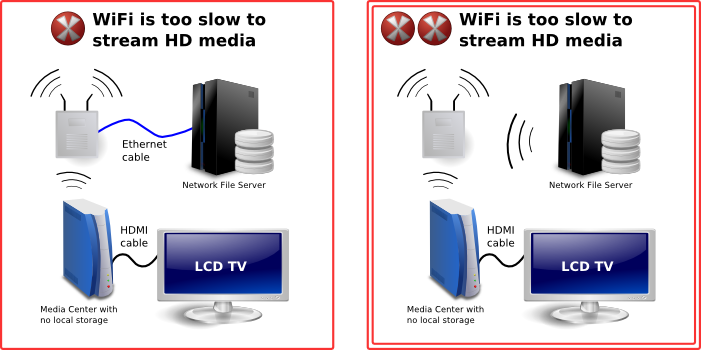
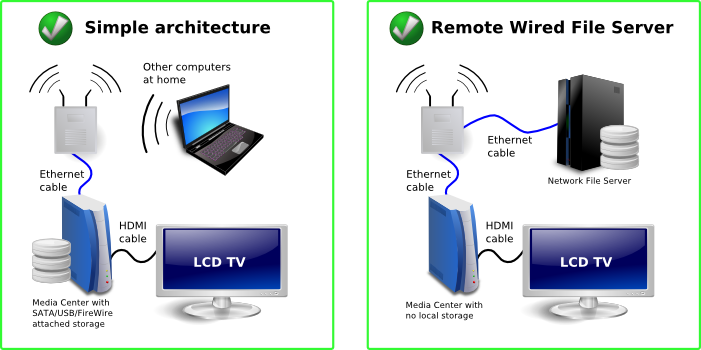
Good network layout for a home Media Center

These are the aproximate brazilian prices I pay for the hardware parts

Description Part Number Price US$
Motherboard XFX 8200 GeForce MI-A78S-8209 $172.22
AMD Phenom Quadcore 9750 HD9750WCGHBOXSN $338.89
Seagate Barracuda 750GB 9BX156-303 $205.56
4GB RAM $133.33
HUNTKEY Power supply 14CM EPS12V LW-6450SG 450W $94.44
HDMI cable $16.67
Nice PC case $138.89
Gotec Remote Control 3801 for Media Center $26.61
Total $1,126.61

Home Networking

You may want to have Media Center(s) in several spots of your home playing media from a central network file server located somewhere else.

You should pay attention to not overload your home wireless network. I had bad experiences streaming HD media from one computer to another over WiFi. A single wall in between can dramatically decrease the kilobits per second the wireless signal can carry, to a level that is lower than your movie’s kilobits per second. The result are unwatchable movies while streaming. Big photos will also take longer to load to a point that will affect negatively your ambient slideshow.

To avoid that:

  1. Have your files physically connected to your Media Center. This can be a plain internal disk (this is my choice) or an external SATA or FireWire or USB attached disk. Remember that USB is much slower (even than FireWire) and file transfers (as copying lots of movies to/from a frined) will take longer time.
  2. Have a separate file server but connect it to your Media Center over a wired network.

Bad network layout for a home Media Center

Software Requirements

Your Media Center will have several simultaneous purposes. The most visible one is to feed your TV with content, but I also use it as a host to run several virtual machines, a web server, file server and to download things. I use mine 40% as a visible Media Center, 30% as a Media Server (to serve media to other computers) and 30% as a host for other purposes.

Forget about using your Media Center as a regular PC with keyboard and mouse. It is simply not practical and will prevent your wife and kids to use it because you are locking its TV. You can connect to and work with it remotely though, with SSH, VNC, Desktop Sharing, Remote Desktop or whatever technology your platform supports. And this can happen while your folks are watching a movie. I found this way of managing my Media Center very practical and productive.

  • Linux-based Media Center

    Linux would be my preferred platform for running a Media Center. It is highly configurable and gives its owner a lot of power. To feed your TV, use MythTV or XBMC. Just make sure that devices as remote control, audio and HDMI interface have drivers and will work on Linux. I had problems with that.

  • Mac OS-based Media Center

    If you are an Apple person, a Mac mini will do the job. It is compact, silent, has a strong enough processor and comes with a nice remote control. If Mac OS is your platform of choice, use FrontRow or XBMC. You will also need a codecs to play all types of media, so download the free Perian codec pack. I don’t know much people that use Mac OS as a Media Center, let me know if you do. You can also use an Apple machine to run Windows.

  • Windows Vista-based Media Center

    Windows Vista has a lot of improvements for managing media when compared to Windows XP. The native File Explorer support for MP3 and photo tagging is excelent, uses open standards as ID3v2 (MP3) and EXIF and IPTC (JPEG photo) and Vista Media Center has partial support for browsing you media collection through these tags (album, artist, genre, date picture was taken, IPTC tags etc). Strangelly, Vista Media Center does not support browsing by multiple genres and multiple artists so an album simultaneously tagged with genres “Samba” and “MPB” will appear only when you list by “Samba”, not by “MPB”.

    Microsoft locks their desktop operating systems in a way that multiple users can’t use it simultaneously, even if there are multiple users created on the OS. This can be fixed installing a small terminal services-related patch. There is also a post-SP1 version of the hack.

    So the modus operandi is to create one user called Media that will automatically login and run the Media Center program at boot, and another one for me to login remotely with Remote Desktop and run stuff simultaneously. The Media user has to be administrator and codec packs and plugin must be installed by him.

    To play advanced and HD audio and video, H.264, MKV, MP4, DivX/Xvid, FLAC etc, you will also need a codec pack for Windows. I recommend the K-Lite Codec Pack and I use its Mega edition. Having that, Vista Media Center will play any type of media.

    I must tell that Windows alone can’t satisfy all my media management needs. Thats why I run a Linux as a virtual machine on the Media Center to make massive manipulations of MP3, photos, video compression, etc.

Still on Vista Media Center, I use several useful plugins:

  • Media Control. Improves usability of the remote control and lets you set subtitle and audio languages, enables fast forwarding etc while playing video.
  • Google Maps for Windows Media Center. Turns my 52″ TV into an interactive map that I can control with my remote control. I don’t know how life was before this.
  • Yougle. Lets you access Internet media from Vista Media Center. In other words, lets you browse and watch YouTube videos, Flickr photos, Internet radios etc.

Happy entertainment !

I was invaded again: more passwords for you not to use

It took some time to have my honeypot invaded again in a useful way. They were attacking constantly but were using it only to connect to IRC rooms. Useless for me.

But yesterday a sweet cracker invaded it again and left behind about 240000 non-unique combinations of user+password he was using to invade others.

They were all merged into the Compromised Passwords file, now with 142002 unique combinations of user+password that you must never use.

Enjoy.

Yawasp Ultimate Anti-Spam Solution

Spam fighting is a difficult job. Many spammers are too smart for Akismet and I was spending too much time cleaning comment spam.

Captcha-based anti-spam methods are ok but they hurt too much the usability and user experience.

Then I finally found Yawasp WordPress plugin that implements an innovative anti-spam method. It makes the comment form field names to be dynamic and to always change so spambots will have a harder time to know what field is what.

Additionally, it creates a hidden field also with a random cryptic name that must be sent empty. Smarter spambots (but not smart enough) usually send it filled because they can’t see the difference between this honeypot field to a real one.

This methods ensure a full shield against spammers without hurting usability. I simply stopped receiving spam since Sunday when I installed it. And Yawasp is reporting this about the 48 hours it is running in my blog:

Yawasp has blocked 888 birdbrained Spambots since its last activation.
♦ 856 Spambots send the default author and/or comment field.
♦ 32 Spambots send the hidden field, but filled it out.

The only drawback of Yawasp is that my WordPress theme PHP code had to be changed to activate Yawasp dynamic filed names hook. But I can deal with that. And Yawasp may also try to change your theme automatically so you don’t have to worry about that.

I recommend Yawasp to any WordPress blog owner.

Compromised Passwords

Hacker emblemI love to see crackers attacking my computers. I even wrote a Linux Magazine article about a successful invasion (portuguese).

Since recently, I leave a virtual machine with an easy password ready to be attacked, just to see these crackers’ leftovers, their rootkits and what they’ll do once they brake into my system.

Guess what. Once inside, they use my system to attack more or to create DDoS-capable networks ready to put some website down. They are not looking for my files, nor my other passwords. They are actually looking for my compute power and want to preserve their anonymity through the use of my Internet address. Pretty useless lifestyle.

Those crackers will rarely explore some Apache or Samba vulnerability to get inside. Few of them have brains for this difficult task. They manage to get inside a system simply because some user password is very simple. They use port scanners to find your SSH TCP port open and then try thousands of combinations of user+password until they login. Once inside, they install this same scanning tools and user+password databases to attack other computers on the Internet.

I started to collect this user+password databases in an alphabetically sorted file and realease it here so people may check if some password they are choosing is well known by crackers or not.

The compromised passwords file has currently 142002 different combinations of user+password that you should not use, and can be downloaded here.

Some classical combinations you’ll find in the file are:

root changeme
root default
root l1nuxb0x
root passw0rd
root password
oracle oracle123
sapdb sapdb

Remember, you will greatelly avoid having your Linux/Unix/BSD/Mac computer being attacked simply following this rules:

  1. Disable SSH “root” login having the following in your /etc/ssh/sshd_config file:
    PermitRootLogin no
  2. Don’t use a user+password combination that can be found in the file I linked above. Use passwords that are difficult to guess.
  3. Change your SSH daemon listening port to something different than the default 22 in /etc/ssh/sshd_config. This is a bit inconvenient — but very effective — because you’ll have to remember to provide the non-standard port everytime you want to access your system.

Pretty obvious, but I keep finding Internt-connected systems with very weak and well known passwords.

Mac OS X as a Virtual Machine

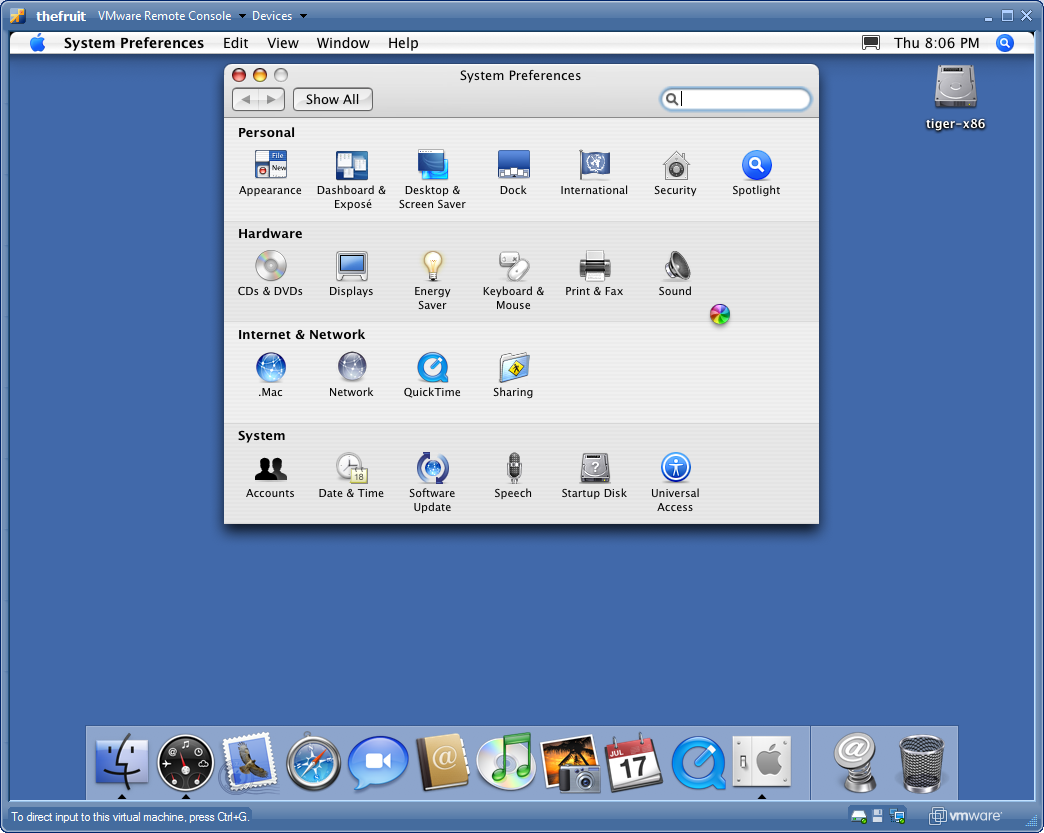
Pay attention to this screenshot. This is Mac OS running as a VMware virtual machine.

Mac OS X as a Virtual Machine

Pretty cool as a proof of technology. But let me tell you, this is quite a useless virtual brick.

The UI is extremely slow. I had to remove the background to improve it a little bit but couldn’t resize to less than 1024×768. Console over network is more than slow, is completely unusable.

Oh, and by the way, there is no networking. The preferences panel recognizes a network interface but it is disabled for configurations, meaning it doesn’t have a driver for VMware virtual network interface. What can be more brick than that ?!

I wanted to have a Mac OS machine to get to know this beautiful platform, maybe develop some apps etc. But I guess I’ll have to wait for improvements for this VMware patches.

Information Worker

Yesterday I met a colleague at IBM Brazil that moved to a world wide position. He is now living in Manhattan, New York.

His everyday routine, as most Information Workers nowadays, is to talk to people, make phone conference calls, e-mails, design and communicate strategies, make some data consolidation and reports, instant messaging, etc.

Since most of this things have become information, and since we have information technology today, he can do his job from any point on earth as long as he has an Internet connection to let the information flow.

He choose NY because he enjoys life jazz and wanted to experiment the Big Apple, not because his job is physically located there. He could choose Montana, Alaska, Manaus, Fernando de Noronha etc to live.

Of course personal contact is sometimes needed. In these occasions, people schedule meetings and get a flight to meet someplace. This is probably cheaper than maintaining an office space for all these information workers, and probably more friendly to the environment than make them drive everyday to a physical location.

I can think about dozens of jobs that could be this way. Lawyers, journalists, writers, architects, web 2.0-related jobs, even also physicians in many situations when they don’t need to examine their patients.

The matter of all these jobs is information and the platform to make it flow is ready — the Internet. Now we just need a sort of cultural shift.

Escher’s Print Gallery Explained

I was oweing this for the lovers of M. C. Escher works.

Last July I visited the wonderful Escher Museum in Den Haag, Holland. One of my preferred works is the Print Gallery where a painting gets mixed with the surrounding real world in a precise geometrical way, as you can see bellow (borrowed from aixa.ugr.es/escher/table.html).

Escher Print Gallery

It is intrigating what happens in the center of the picture, where the distortion would be very chaotic.

In the museum there was a screen that played the following video with a computer simulation recreating the chaotic center. I recorded it with my own camera. Quality is not perfect, but watchabel.

It was calculated and produced by some university I can’t remember the name. If you know who made it, please let me know to put the credits here.

Check it out.

First Views of Our Baby

This is the 12 weeks plus 4 days ultrasound result of our baby.

We don’t know yet if its a boy or a girl. Stay tuned, it will be revealed in the next one.

He is growing fast and we are looking forward for his arrival in february.

[flashvideo filename=http://avi.alkalay.net/articlefiles/2008/08/2008-08-15-Ultrasound_Parts-H264_672x464_650kbps-AAC_64kbps.mp4 overstretch=none width=672 height=487 showstop=true autostart=true volume=100 /]

If you can’t see the video above, please update your Flash Player here. It is a DVD-quality MP4 video compressed by x264.

A Test with High Definition Video Conferencing

I just participated in very successful proof of technology with Siemens OpenScape video conferencing products.

We made a point-to-point SIP high definition video conference over a local area network. Another test used H.323 protocol. We also included my SIP-enabled Nokia E61i in the conference over the office WiFi network in a direct multipoint call simply calling my phone’s IP address. Crystal clear sound.

The equipment statistics showed the following:
Video

  • 1280×720 resolution (720p HD) at 30 frames per second
  • H.264 compression
  • aprox. 1780 kilobits per second for the compressed video stream

Audio

  • AAC-LC compression
  • aprox. 70 kilobits per second for the compressed audio stream

Total of aprox. 1850 kbps for excellent and smooth audio and video quality.

Web 2.0 Heaven for Brand Owners

There is this website called Brand Tags that lets people quickly tag brands that pop up in a web 2.0 style.

Then you can also browse brand names and see their tag cloud.

For example, Linux is associated with “penguin”, “free”, “tux”, “cute”, “free” etc. Windows gets “computer”, “crap”, “crash”, “monopoly”, “sucks” etc. Apple gets “apple”, “computer”, “awesome”, “cool”, “design”, “innovation”, “love”, “trendy”. IBM gets “big big blue”, “boring”, “computer”, “corporate”, “old”, “pc”, “thinkpad”. Nike has a scary association with “child labor”. Oracle has a plain “database”.

In portuguese we use to say that people’s voice is God’s voice.

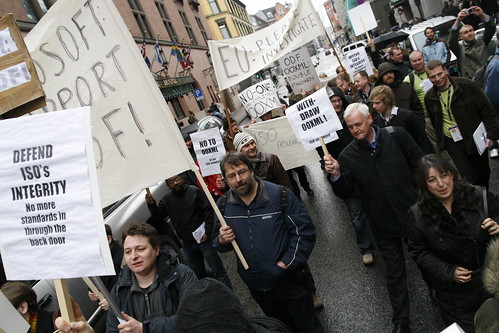
OOXML in the ISO’s limbo

ISO has a press release about the 4 countries (India, Brazil, South Africa and Venezuela) and their appeal against the OOXML standardization.

The important part of it is this:

According to the ISO/IEC rules, a document which is the subject of an appeal cannot be published as an ISO/IEC International Standard while the appeal is going on. Therefore, the decision to publish or not ISO/IEC DIS 29500 as an ISO/IEC International Standard cannot be taken until the outcome of the appeals is known.

Which means OOXML cannot become a standard until the appeals get resolved and all countries get satisfied with the outcome.

In other words, OOXML is stucked in the limbo. It can’t be described, considered or even sold as an ISO standard.

It was sort of approved but can’t be approved. Well, the final specification text was not published yet anyways. With some luck, to technically fix OOXML can take the same amount of time as of solving the appeal.

Then we’ll go back to first question: does the world need tow standard ways to describe “helvetica, 12pt with red” or “a table with 3 columns and 5 rows” or even “page layout with 1.5cm margins” ?

As a reference, Brazilian appeal was published in Andy’s blog and is an informative yet concise enough text to understand the technical and process issues around OOXML.

Iron Man and Programmers

The Iron Man

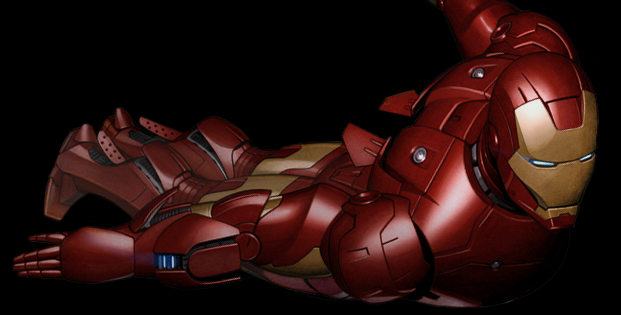
The Iron Man movie is all about programmers. Being challenged and have to invent something that will make you get rid of hand work, the adventure of a project, to mold, test and debug, and the joy of having a prototype inspiring the next perfect design.

Just don’t miss it. The metal man movie has a lot of Heavy Metal music and Robert Downey Jr., both fit perfectly.

Oh, and stay until after the final credits to see what are the plans for the next movie.

Developers: ISO Standards Do Matter

A post by Michael DeHaan and others inspired me to say a few words about the importance of ISO standards for developers:

Many developers are clamming that good specifications are more important than standards, specially now that the OOXML process opened to the public the dungeons of ISO processes and how the organization produces standards. This is a clear example on how ISO’s reputation is compromised.

But unfortunately “ISO standards” are what governments tend to use. These are the words they put in their Request For Proposals when they are going to buy things. These “ISO standards” are the words they use to claim how they’ll interoperate and trade across borders. And also how public institutions will interoperate with private institutions. Over time, it defines also how private institutions use technology.

So yes, ISO standards for Information Technology do matter from a developer standpoint because they are crucial in shaping the flow of information in the society in general.

Lets put it this way: technical specifications stand for research and development team while to be an ISO standard equals to have a strong sales force. An IT product needs both to succeed.

So you, developer, can use whatever you want or like. But if you want to interoperate with non-developer folks, you — the smartest guy in this context — will have to use what non-developers use, and they use what has a stronger marketing force as “this is an ISO standard”. This is why ISO standards (good or bad) should be in the focus of our attention.

Since the world already has an International Standards Organization, and since we learned it must be patched, it is our responsability — we, the developers, geeks, sysadmins etc — to be aware of and get involved with what ISO is standardizing right now and help the technical process of standardization to happen solely with technical arguments and not political interests.

Otherwise the future world will still be divided in two groups of developers: those that develop with/for good stuff and those that develop with/for stuff used by non-developers just because a powerful company had the strength to standardize it whatever it takes.

Upgrade to WordPress 2.5

This is my first post in the new WordPress 2.5.

Upgrade was as easy as:

$ cd avi.alkalay.net
$ svn sw http://svn.automattic.com/wordpress/tags/2.5/

Everything worked without any changes, including my experimental content-optimized Plasma theme.

The new WordPress has lots of improvements, specially in the administration part and I recommend it.

OOXML: Open Letter to YES-voting and ABSTAIN-voting Countries

I am learning a lot from all this standardization process.

I was a member of the brazilian committee and I also analyzed the specification. My country disapproved OOXML and I think this was a decision based on logic lead by the process.

The JTC1 rules page 49 item 9.8 says:

NBs may reply in one of the following ways:

  • Approval of the technical content of the DIS as presented (editorial or other comments may be appended);
  • Disapproval of the DIS (or DAM) for technical reasons to be stated, with proposals for changes that would make the document acceptable (acceptance of these proposals shall be referred to the NB concerned for confirmation that the vote can be changed to approval);
  • Abstention (see 9.1.2).

[Note: Conditional approval should be submitted as a disapproval vote.]

In other words, from my understanding, if there is one or more technical problems, the NB must disapprove the DIS. Many countries found many technical problems in OOXML that are still unresolved even after the BRM.

I also understand that such an important matter as an International Standard for Office Documents can’t be defined by 10 or 30 opinions collected as votes in a committee. Thats why the JTC1 process above talks about technical content, not opinion or vote. What I learned from studying the OOXML specification is that it is not ready for acceptance since many countries have found and reached consensus that the spec has problems, even after the BRM. If the NB-leveraged technical team — formed by people that would vote YES and NO — has produced a list of submitted problems in the spec, this list is by itself the consensus that the spec is still problematic.

I would like to understand why an NB that has produced technical comments voted YES or ABSTAINED. I thought abstention is a position for countries that were not able to create a committee to technically discuss the specification for reasons such as logistics or lack of quorum.

I am learning about all this and I’d like to have more solid arguments to build an opinion about these NB’s maturity to run a well documented process.

OOXML: Venezuela changed vote from YES to NO

Check it out:

From: “***FONDONORMA***” <in*&%@fondonorma.org.ve>
To: <ki*%$#@itscj.ipsj.or.jp>, <br*%$#%@iso.org>, <tak*%$#%@iso.org>, <ga*%$#%@iso.org>, “Maria Teresa Saccucci” <mar*%$#%@fondonorma.org.ve>, “Norma Arias” <norm*%$#%@fondonorma.org.ve>, “***FONDONORMA***” <in*%$#%@fondonorma.org.ve>
Date: Fri, 28 Mar 2008 14:04:26 -0430
Subject: Modification to the vote on DIS 29500 – Venezuela (FONDONORMA)
Toshiko Kimura
Secretary ISO/IEC JTC 1/SC 34

Att.: Mr. Keith Brannon, Mr. Maho Takahashi, Ms. Martine Gaillen

Dear Mr. Kimura,

Attached please find a letter from Mrs. María Teresa Saccucci, Standardization Manager of FONDONORMA (Venezuela) through which Venezuela wishes to modify its position on DIS 29500, Information technology – Office Open XML file formats from “Approval with comments” to “Disapproval with comments”.

Best regards,

Leonardo Di Bartolo
Coordinator of International Relations
FONDONORMA
Venezuela

This NO was a result of a very difficult meeting. Consensus was not reached and a lot of confusion happened. Exactly as in the first brazilian NO.

The NB had to decide the final vote based on technical issues still open in OOXML. The problem was the method of deciding and those technical points were not presented. So people only had in their head the Microsoft arguments that I already knew were part half trues and part complete lies.

I participated in the OOXML process in 3 countries and I was able to build an opinion on how normalization happens today in the world, and I’ll show some ideas in a future post.

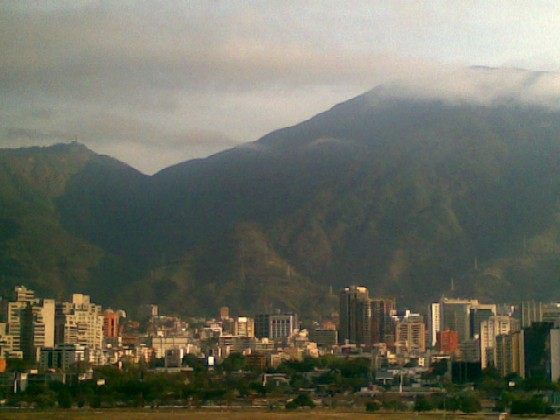
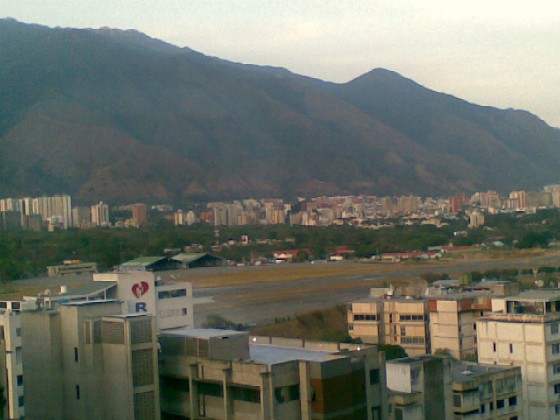
By the way, this is how Caracas looks like, a city surrounded by huge green mountains that have behind them the Caribbean Sea.

Caracas from the EuroBuilding hotel

Caracas and the Caribbean Ocean in the map
Caracas from the EuroBuilding hotel

OOXML’s BRM: A flow of dirt

Finally Jomar, one of the brazilian delegate that went to OOXML’s BRM in Geneva has started to tell all the dirty little details of what really happened in that meeting and the surreal modus operandi of how 120 people can discuss 1027 issues in 5 days. Have fun in english and portuguese.

Oh, and talking about dirty playing, check the domain www.DocumentFreedomDay.com but remember that the original one is www.DocumentFreedom.org. The first one really deserves a DDoS attack.

OOXML: Brazil Says NO. Again.

It is now official. Brazilian vote was decided by consensus of the entire technical team, including Microsoft crew’s: OOXML does not deserve to be an international ISO standard.

Our first vote, in august, was also NO, due to the same reasons: OOXML is an awful specification.

That outcome was expected because we simply followed the process: technically analyze the OOXML specification, make comments, wait for responses, analyze them and see if all problems were fixed. Is there any single remaining unresolved problem? Vote NO. And in fact there were many many unresolved problems.

If every country followed this simple process, OOXML would receive a NO from 100% of them.

But in some countries, how is the process? Invite a few companies and simply count their votes. The problem here: 10, 20 or 80 votes can never represent what is the best for that country. Only, maybe, if you collect one vote for each citizen.

What I am trying to say is that in this case a decision must be reached by technical consensus, not vote. It is not a matter of will, but a technical issue that can only be reached by rational analysis and deliberation.

In Chile for example, 21 voting companies will define a 15 million people country vote in ISO. How easy is to lobby these 21 companies with Power Point presentations telling complete plain lies ?

Technically speaking, if your country’s vote was YES or ABSTENTION, one of these possibilities happened:

  1. Nobody had time to analyze the OOXML specification and the ABSTENTION was the right choice.
  2. Nobody had time to analyze the OOXML specification and a few people decided for you to vote YES, based on ideology or a result of lobby, not technology benefits.
  3. Even having time to analyze the OOXML specification, a few people decided for you to vote YES, based on ideology or result of lobby, not technology benefits.

Seems stupid, but these are exactly the 2 possibilities of OOXML getting YES votes in ISO. It is still an awful specification.

By the way, Brazil would vote NO again and again and again even if all OOXML’s technical issues could be resolved. OOXML would still have legal issues and also serious overlap problems with the OpenDocument Format ISO standard.

I was not present in today’s meeting in ABNT because I already knew what would be the result, since the process of analysis and deliberation in Brazil was very strictly followed. Hopefully Jomar will write about it and you can check more details.

Open Source Software inside the iPhone

Can Open Source Software be more ubiquitous than this ?

A few days ago I was playing extensively with Apple’s iPhone, investigating each sub-menu and little details. There is a section listing legal stuff and software being used with each license. GPL, LGPL, BSD and other Open Source licensed software rule the iPhone.

Some I have noted:

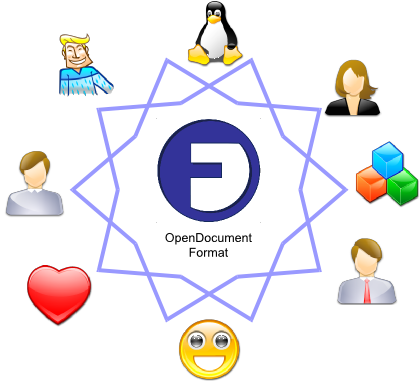
Microsoft sells Intra-operability as Interoperability

Interoperability

This is real Interoperability

  • Technical specifications for global interoperability and freedom
  • Interoperate through standards
  • Software product is less important
  • Switch products and keep access

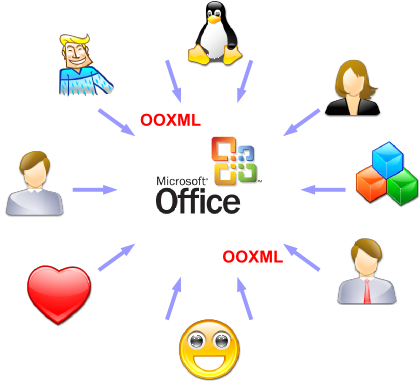
Microsoft started their so called “interoperability” initiative. With a deeper look we find that the main objective of the released specifications is to let developers interact with their products only, something I like to call Intra-operability.

Intraoperability

This is Intraoperability

  • Technical specifications for interaction with and favor the product
  • Interoperate through the product
  • Software product is the main player
  • Switch product and loose access

See the difference?

Microsoft technical specifications have serious technical and legal issues, and are being released not to increase interoperability across people, organizations and applications, but to leverage the use of their products. For the standard document format scenario: OOXML is about allowing other people to interact with files that are primarily generated and manipulated with Microsoft Office. It is not about full interoperability, which would enable competition with Microsoft Office, for obvious reason.

For each purpose or scope, better open standards exist and should be adopted and used instead: Java versus .NET, XHTML versus IE-campatible-only DHTML, ODF versus OOXML, etc

My friend Cezar Taurion has also written some words about Intra-operability (in portuguese). Bob Sutor also put together some words about it.

These graphics are available in a friendly Creative Commons license, in this animated ODF file, in case you want to integrate them in your presentations. PDF export also available.

How Microsoft raped ISO

One of the most critical and discussed points of the whole OOXML subject is how the specification lets you include binary proprietary information.

Let me show you how it happens with a piece of an OOXML document, the red-marked text is the problematic part (see for yourself, §6.2.2.14, paper page 4,813, lines 7–13):

<v:shape>
<o:ink i="AMgFHQSWC+YFASAAaAwAAAAAAMA..." annotation="t" contentType="application/x-ms-ink"/>
</v:shape>

So you, as a programmer, please tell me what to do if you are developing an application that must read and generate this kind of document. How can I find documentation about this encoded binary stream? Is this a good practice in XML? Anyway, this kind of (bad) design appears in many parts of the OOXML spec. Want more examples of bad design? Have fun.

Suppose I really want to develop this kind of support in my application, I am a master programmer and reverse-engineered a few examples generated with a copy of MS Office 2007 that I had to buy. Or maybe I just found the specification of this proprietary application/x-ms-ink type and go to develop a library to handle it.

Inevitably, my library will reimplement aspects of some Microsoft library with same functionality, and according to a Software Freedom Law Center report, the Microsoft Open Specification Promise (OSP, basically the not-open-enough license Microsoft lawyers wrote for the usage and implementation of OOXML) cover’s the specification only, not code.

I will be sued for patent infringement. On software rewrite, not on specification usage.

Then the rape begins. Microsoft is claiming that this was solved in the ISO’s BRM meeting. This is the solution, from the ridiculous 12 pages resolutions, page 7:

Resolution 25: The BRM decides to accept the editing instructions contained in http://www.itscj.ipsj.or.jp/sc34/def/BRM/Response_0135_bitfields.doc in place of R 135, replacing “deprecated” by “transitional”, and with the following addition: The Editor shall ensure that all existing attributes defining the bitfields described above shall be “transitional”—so resolved.

Who reads this resolution with high level eyes may think that all binary fields will be removed from the specification. But please, you, as a programmer, tell me how the so called Editor will find all and every single part of a 6000+ pages specification containing bitfields? How he’ll expand all those bitfields in an XML subspecification? Will he invent some? Is he the right person (or team) to do that?

When done and if done, the specification will be something completely new, full of new parts. Will jump from 6063 pages to maybe 7500. Oh, and did I mention it will be something that even MS Office 2007 or 2008 don’t support today? Supporting or not, implemented or not, this new unexistent specification is the “thing” that countries’ National Bodies are voting right now, without even seeing it, without checking if it was corrected, without having time for this because they didn’t receive it for revision.

They won’t have time to review 6000+ pages because the deadlines defined by the ISO’s Fast Track process are over.

So the question is how ISO/IEC and JTC1 let such a big and problematic specification enter the light Fast Track process? My answare: ISO was raped.

I’ve been talking to several people that will define their country’s vote and their mindset is “are you really putting ISO in such a bad position?” Well, yes. You know, in the end ISO is not god. They are a bunch of people that, like you and me, have religions, aspirations, problems, family, go to the bathroom etc. Like you and me, they may be also naive in regard to some subjects, particularly document formats. Then comes Microsoft excellent speakers showing PowerPoint charts that are plain lies (e.g. “OpenOffice.org supports OOXML”) and people believes them.

People have two choices: to question ISO’s reputation in the OOXML case, or question IBM, Sun, Oracle, Red Hat, Free Software Law Center, ODF Alliance and many other institutions’ reputation when they massively scream in chorus that OOXML has serious technical, legal and standardization process issues.

This is a world where organizations like ECMA has completely lost the respect of the technical community. But this is not a big problem, because we have other similar, still reliable bodies as OASIS, W3C, OSF, etc.

This is a world where we will have to work hard to make ISO regain its (currently damaged) reliable status. This is a big problem, because we only have one (and only need one) International Standards Organization.

This is your responsibility. To start this work get involved with your country’s National Body for standardization and promote the creation of a formal letter to ISO about the OOXML process, its problems and how ISO let that happen. INCITS in USA, ABNT in Brazil, INN in Chile etc.

Better sleep leads to a better You

The title was the phrase written in a CD left in a Crown Plaza Hotel room I stood this days.

Its excellent content is a relaxation program with very soft music to listen and do after you go to bed and before you fall asleep, with the aim to make you sleep better.

I found it so effective that I read more through the CD cover. It is produced by a company called SoundSleep with the help of a certain Dr. Michael Breus.

The cover also contained some other “holistic approach to sleep principles” which I also find useful and would like to share:

  • Relax before bedtime. Stress can make you miserable and restless. Take some time for a pre-sleep ritual to break the connection between stress and bedtime. Try listening to the enclosed Sleep CD, reading, meditating, light stretching, lavender aromatherapy or a hot shower.
  • Watch the caffeine. Coffee and many teas and sodas contain caffeine and may keep you up. If you’ve already had too much, consider eating some carbohydrates like bread or crackers to help reduce the effects.
  • Watch the alcohol. Alcohol may initially help you fall asleep, but as your body clears it from your system, it can also cause nightmares, sweats and headache. Drink one glass of water for every alcoholic beverage consumed to try to reduce these symptoms.
  • Exercise at the right time. Regular exercise relieves stress and encourages good sleep. However, if a little exercise really gets your blood pumping, you’d be wise to not work out in the evening or just before bedtime.
  • Cut down on noise, light and extreme temperatures. Try earplugs, a night light, an eye mask or drape clip. The best temperature for sleep is 20 to 22°C (68 to 72°F).
  • East right, and sleep tight. Avoid eating a large meal just before bedtime or going to bed hungry. It’s about balance. Some foods that promote sleep include: milk, pumpkin, artichokes, avocados, almonds, eggs, peaches, walnuts, apricots, oats, aspargus, potatoes and bananas.
  • Understand jet lag. Before you cross time zones, try waking up later or earlier to help the body adjust to time difference. And remember, it takes a few days for the body to catch up.
  • Remember the purpose of the bed. Avoid TV, eating, and emotional discussions in bed. The mind and body associate bedtime activities with being in bed. So don’t let a bad habit keep you awake.
  • No drinks after 8 p.m. It’s a fact; most of us cannot simultaneously go to the bath room and sleep. So shut down your fluid intake before 8 p.m. so you can get your rest.
  • Nap smart. A little 20-minute power nap during the early part of the day can really be refreshing. But sleep too much, and you may spend the night staring at the ceiling.

How I Became Vegetarian

Around early 1995 I was thinking about to stop eating meat. I thought that would do good for my body and my mind.

Then I was waiting in a room, randomly took a book and randomly open it in the part that finally defined my decision. Later a saw many people becoming vegetarian because of the same part from the same book, so I found it important to share. The author was Sri Yukteswar and the book name is The Holy Science, from 1894.

This is the part of the book that influenced my decision that time (copy and pasted from Sain Louis’ Guide to Vegetarian Life):

What is natural food for man?

First, to select our natural food, our observation should be directed to the formation of the organs that aid in digestion and nutrition, the teeth and digestive canal; to the natural tendency of the organs of sense which guide animals to their food; and to the nourishment of the young.

Observation of teeth

By observation of the teeth we find that in carnivourous animals the incisors are little developed, but the canines are of striking length, smooth and pointed, to seize the prey. The molars also are pointed; these points, however, do not meet, but fit closely side by side to separate the muscular fibers.

In the herbivorous animals the incisors are strikingly developed, the canines are stunted (though occasionally developed into weapons, as in elephants), the molars are broad-topped and furnished with enamel on the sides only.

In the frugivorous all the teeth are of nearly the same height; the canines are little projected, conical, and blunt (obviously not inteded for seizing prey but for exertion of strenth), The molars are broad-topped and furnished at the top with enamel folds to prevent waste caused by their side motion, but not pointed for chewing flesh.

In Omnivorous animals such as bears, on the other hand, the incisors resemble those of the herbivorous, the canines are like those of the carnivorous, and the molars are both pointed and broad-topped to serve a twofold purpose.

Now if we observe the formation of the teeth in man we find that they do not resemble those of the carnivores, neither do they resemble the teeth of the herbivorous or th eomnivorous. They do resemble, eactly, those of the frugivorous animals. The reasonable inference, therefore, is that man is a frugivorous or fruit-eating animal.

Observation of the digestive canal

By observation of the digestive canal we find that the bowels of carnivorous animals are 3 to 5 times the length of their body, measuring from the mouth to the anus; and their stomach is almost spherical. The bowels of the herbivores are 20 to 28 times the length of their body and their stomach is more extended and of compound build. But the bowels of the frugivorous animals are 10 to 12 times the length of their body; their stomach is somewhat broader than that of the carnivorous and has a continuation in the duodenum serving the purpose of a second stomach.

This is exactly the formation we find in human beings, though anatomy says that the human bowels are 3 to 5 times the length of man’s body – making a mistake by measuring the body from the crown to the soles, instead of from mouth to anus. Thus we can again draw the inference that man is, in all probability, a frugivorous animal.

Observation of organs of sense

By observation of the natural tendency of the organs of sense – the guideposts for determining what is nutritious – by which all animals are directed to their food, we find that when the carnivorous animal finds prey, he becomes so much delighted that his eyes begin to sparkle; he boldly seizes the prey and greedily laps the jetting blood. On the contrary, the herbivorous animal refuses even his natural food, leaving it untouched, if it is sprinkled with a little blood. His senses of smell and sight lead him to select grasses and other herbs for his food, which he tastes with delight. Similarly with the frugivorous animals, we find that their senses always direct them to fruits of the trees and field.

In men of all races we find that their senses of smell, sound, and sight never lead them to slaughter animals; on the contrary they cannot bear even the sight of such killings. Slaughterhouses are always recommended to be removed far from the towns; men often pass strict ordinances forbidding the uncovered transportation of flesh meats. Can flesh then be considered the natural food of man, when both his eyes and his nose are so much against it, unless deceived by flavors of spices, salt, and sugar? On the other hand, how delightful do we find the fragrance of fruits, the very sight of which often makes the mouth water! It may also be noticed that various grains and roots possess an agreeable odor and taste, though faint, even when unprepared. Thus again, we are led to infer from these observations that man was intended to be a frugivorous animal.

Observation of the nourishment of the young

By observation of the nourishment of the young we find that milk is undoubtedly the food of the newborn babe. Abundant milk is not supplied in the breasts of the mother if she does not take fruits, grains, and vegetables as her natural food.

Cause of disease. Hence from these observations the only conclusion that can reasonably be drawn is that various grains, fruits, roots, and – for beverage – milk, and pure water openly exposed to air and sun are decidedly the best natural food for man. These, being congenial to the system when taken according to the power of the digestive organs, well chewed and mixed with saliva, are always easily assimilated.

Other foods are unnatural to man and being uncongenial to the system are necessarily foreign to it; when they enter the stomach, they are not properly assimilated. Mixed with the blood, they accumulate in the excretory and other organs not properly adapted to them. When they cannot find their way out, they subside in tissue crevices by the law of gravitation; and being fermented, produce diseases, mental and physical, and ultimately lead to premature death.

By the way, I am not 100% vegetarian today. I still have seafood very rarely, when is very difficult to find veggy options in some fancy restaurants.